Background removal models usually run on GPUs. GPUs are fast, but they're expensive to keep warm, and a service that scales to zero makes the next request wait while it starts up. On our GPU host, that first request after an idle period took over a minute, mostly spent importing Python libraries rather than anything inherent to GPUs (we've since cut it to about 14 seconds). So we asked a narrower question. Can our highest-quality model run on ordinary serverless CPUs, and what does it take to do that without making a single cutout worse?
We set one rule before starting: any change that visibly alters the cutouts doesn't ship, however fast it is.
The model is BiRefNet, an open-source segmentation model (MIT license) that's among the most accurate public models for separating a subject from its background. It comes in two general-purpose sizes: General, with a large Swin-L backbone, and Lite, with a small Swin-T backbone. We ran both through ONNX Runtime on Google Cloud Run, with 2 to 4 vCPUs and no GPU, between November 21 and 22, 2026.
Results at a glance
| Where we started | Same small model, after | Large model, after | |
|---|---|---|---|
| Model | BiRefNet Lite | BiRefNet Lite | BiRefNet General |
| Model file | Widely used 2024 ONNX export | Our re-export | Our re-export |
| Server | 2 vCPU | 4 vCPU | 4 vCPU |
| Time per image, warm | 35 s | 6.5 s | 24 s |
| Container start-up, before the first image² | 109 s | 7 s | 28 s |
| Peak memory¹ | 6.0 GiB | 1.6 GiB | 4.4 GiB |
| Mask vs the original PyTorch model | Off by up to 66 of 255 levels | Within 1 level | Raw output within 0.002³ |
| Compute per 1,000 images⁴ | About $2.60 (projected) | $0.91 | $3.18 |
¹ Measured on a laptop, where the same comparisons were run in one sitting.
² Time for a new instance to become ready, from Cloud Run's logs. A request that triggers a cold start also waits for its own processing on top, so General's first request after idle should take roughly 28 + 24 seconds; we didn't time that end to end.
³ We compared General's raw model output, not its mask: it differs from PyTorch by at most 0.002, before the sigmoid, rescaling and rounding that produce the 0–255 mask. We didn't compute General's mask difference.
⁴ Cloud Run list price for CPU and memory, request-based billing in us-central1, before any free tier. The two "after" figures use billed instance time measured over a few requests. We didn't measure billing for the starting setup, so its figure is projected from its 38-second warm round trip. Treat all three as estimates.
Three findings did most of the work:
- The ONNX files most tools use aren't quite the model. They spell out one operation the slow way. Re-exporting with ONNX's native operator for it cut memory sharply, sped things up, and made the output match the original model.
- The small model is nearly 4× faster and misses whole subjects. We chose the large one.
- Quantizing to 8-bit integers was 1.45× faster, and we didn't ship it. It shifted edges and dropped small objects.
1. The ONNX file wasn't quite the model
To run BiRefNet outside PyTorch, most tools use ONNX files exported from it in 2024, including rembg, a popular open-source background removal library. BiRefNet's decoder uses deformable convolutions: convolutions that learn where to sample, so they can follow an object's real outline instead of a fixed grid. PyTorch's exporter can't write that operation as a single ONNX operator, so those files spell it out as thousands of elementary steps: gathers, transposes, multiplies and sums.
On a CPU that has three costs, which we measured on the small model:
- Memory. The spelled-out version builds large intermediate copies of the feature maps. Peak memory was about 6 GiB, for a model whose weights are 224 MB.
- Time. Nearly half the processing time went to transposes, sums, multiplies and gathers rather than to the model's real arithmetic.
- Accuracy. The output isn't numerically the same model. On our test photo, 1.7% of mask pixels differed from the original PyTorch model by more than 2 of 255 levels, and the largest difference was 66.
ONNX has had a native DeformConv operator since 2023, and ONNX Runtime can run it on CPU. BiRefNet's authors already recommend the native operator in their README for exactly this reason. We wrote a short export script that maps PyTorch's deformable convolution onto it, re-exported the official weights, and made the script refuse any file whose mask differs from PyTorch by more than 2 levels.
| Model and file | Time per image (laptop, 4 threads) | Peak memory | Mask vs PyTorch |
|---|---|---|---|
| Lite, 2024 export | 13.2–14.1 s | 5.8 GiB | Up to 66 levels off |
| Lite, native export | 8.8–9.0 s | 1.6 GiB | Within 1 level |
| General, 2024 export | 33.7–34.0 s | 6.7 GiB | Not measured |
| General, native export | 28.5–29.4 s | 4.4 GiB | Raw output within 0.002³ |
On Cloud Run the effect was larger: on 4 vCPUs the small model went from 20 s to 6.5 s per image. The native file also uses a newer PyTorch and BiRefNet's current code, so not every gain comes from the one operator. But the profile shows where the time went, and that the slow steps disappeared.
2. The fast model misses whole subjects
Lite was nearly 4× faster than General on the same machine. On simple photos, such as a dog or a portrait, the two produce nearly identical masks. On busy scenes they don't. Here's a row of potted plants:



Lite kept two monstera leaves and dropped everything else. General did much better, but it isn't a complete cutout either: it kept the pots and plants in the middle of the row, dropped the tall plants and pots at both ends, and kept one light bulb. Neither result is ground truth, but General's is far closer to what a person would cut out. Lite's failure isn't an export problem: the old and new Lite files made the same choice. It's the model. Lite also left fragments of barbed wire floating around a set of chairs. BiRefNet's authors report the same gap on their validation set: weighted F-measure 0.875 for General against 0.830 for Lite (DIS-VD, model zoo).
So General is the model we run on our CPU deployment (our GPU service still runs Lite), and the rest of the work was about making General affordable.
3. A 1.45× speedup we turned down
In General, 61% of the processing time goes to the large matrix multiplications in its Swin-L backbone. The standard way to speed those up is INT8 quantization: store and multiply weights as 8-bit integers instead of 32-bit floats. We used ONNX Runtime's dynamic INT8 quantization on only the matrix multiplications with constant weights, which takes one call. It made General 1.45× faster on our laptop.
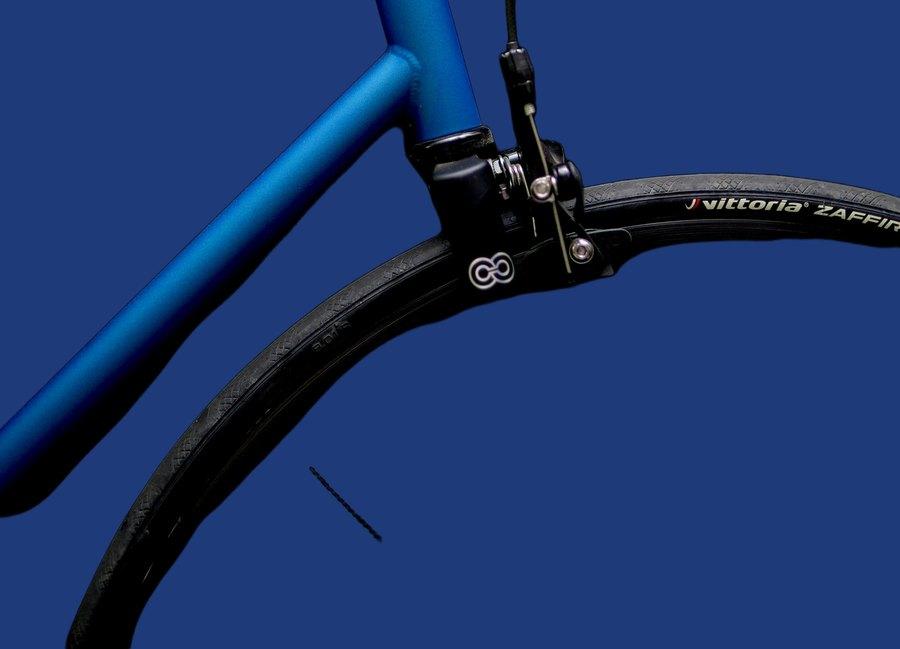
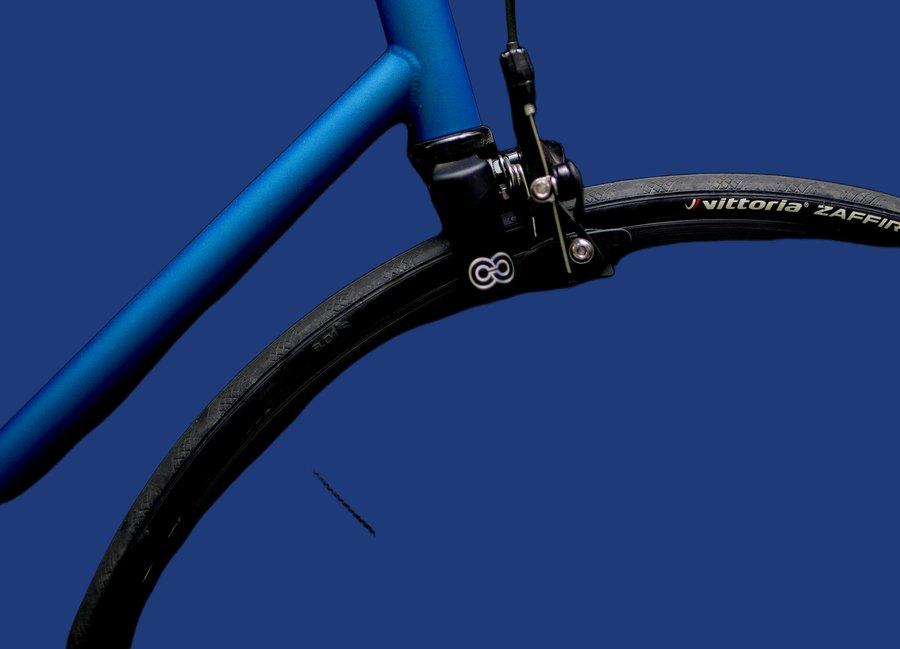
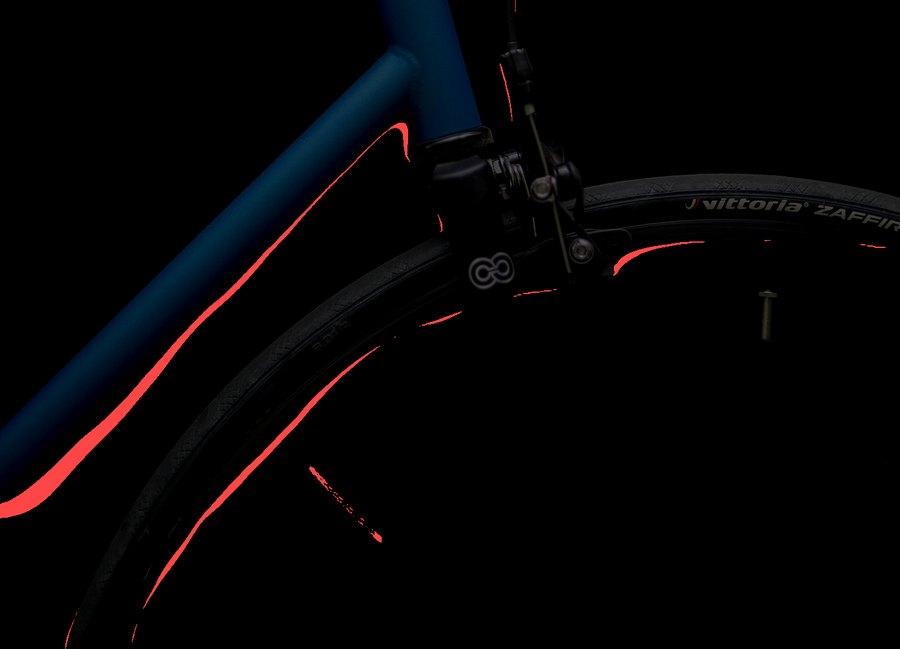
We compared every mask with the full-precision version. On most photos the difference is tiny, and averaged over an image it always looks small: at most 1.5 of 255 levels. But averages hide where the changes are. On a bicycle against a black background, INT8 moved the edges along the tyre and the underside of the frame:
| Photo | Pixels changed by more than 64 of 255 levels | Mask overlap with full precision |
|---|---|---|
| Bicycle | 0.66% | 0.969 |
| Table of food | 0.50% | 0.992 |
| Chairs in barbed wire | 0.27% | 0.985 |
| Raised drinks | 0.24% | 0.992 |
| Potted plants | 0.13% | 0.993 |
| Sunglasses | 0.03% | 0.992 |
| Curly hair | 0.00% | 0.998 |
| Dog | 0.00% | 0.999 |
On the table of food, INT8 also dropped a folded napkin that the full-precision model kept. Each change is small. Together, they mean a customer could get a different cutout than the model is capable of. We kept full precision.
Quantization isn't ruled out for good: quantizing only the layers that don't move the mask is a more careful version we haven't tried. But one call that changes the output isn't an optimization we'd ship.
We also turned down a memory saving. Switching off one of ONNX Runtime's graph optimizations cut General's memory by a third but made it 25% slower. Memory wasn't the constraint, compute was.
4. The server settings mattered as much as the model
Some of the biggest gains had nothing to do with the model:
- Cloud Run's second-generation execution environment made the same container about 27% faster (39 s to 28.5 s per image for Lite on 2 vCPU) and started it in half the time. Cloud Run documents it as faster for CPU-heavy work; left unspecified, Cloud Run picks an environment for you.
- A lean server. The original server loaded the whole rembg library, and took 109 s to start. A server that serves the ONNX file directly with ONNX Runtime started in 14 s, and in 7 s in the second-generation environment. General takes 28 s to start before it processes its first image. About 21 s of that is creating the model session, which loads and optimizes its 930 MB model; on a laptop the same step takes 5 s. We suspect reading the file from Cloud Storage on a fresh instance accounts for much of the difference, but we haven't measured it separately.
- The model lives outside the container. The container holds only code (155 MB) and reads the model from Cloud Storage at start, so changing models doesn't need a new image. (Update, November 22, 2026: baking the native General model directly into the container image confirmed that suspicion—cold start dropped from 28 s to 13.5–15.5 s, and session creation from 18.4 s to 7.5–8.6 s, with identical cutouts.)
- Memory sizing shows up as errors, not slowness. With the 2024 file, Lite failed with 503 errors at 6 GiB on 2 vCPU, and on one photo at 7 GiB on 4 vCPU, because more threads use more memory. The native file runs Lite in 3 GiB and General in 6 GiB.
What it costs, and what's next
At Cloud Run's list prices, the large model costs about $3.18 per 1,000 images in CPU and memory, close to the roughly $2.60 we project for the small model at the start, for the more accurate model. The small model, re-exported, costs $0.91.
Speed is the open problem. 24 s per image is fine for batch work and API jobs, but too slow to wait for in an editor. Here's what we'll try next, each held to the same rule:
- Intel's OpenVINO runtime. The Cloud Run instances we got had AVX-512 and VNNI, instructions that OpenVINO is built to use. Cloud Run only guarantees AVX2, so we'd check which instructions each instance has.
- Careful quantization. Measured on Cloud Run instances with VNNI, quantizing only the layers that don't change the masks.
- Ground-truth testing. Scoring against hand-made reference masks, not just against another model. Agreement is what we measured here; correctness is what customers see.
How we tested
- Machines: an Intel Core i7-1265U laptop for side-by-side comparisons; Google Cloud Run in
us-central1, one request at a time. The instance we logged was an Intel Xeon at 2.6 GHz with AVX-512 and VNNI; Cloud Run only guarantees AVX2, and the hardware can differ between instances. - Software: ONNX Runtime 1.30–1.32 on CPU; the official BiRefNet weights
BiRefNet-general-epoch_244(General) andBiRefNet-general-bb_swin_v1_tiny-epoch_232(Lite); PyTorch 2.15 for the re-export. - Photos: our hair sample photo, photos from the 50-photo Unsplash test set of our earlier benchmark at a 2048-pixel long side, and one upscaled 12-megapixel image to test memory.
- Timing: server-side processing time per image, median of the requests after the first; start time from Cloud Run's logs; cost from Cloud Monitoring's billed instance time.
- Masks: the transparency channel from 0 to 255; "overlap" is intersection over union with the mask cut at 128.
Limits. Each Cloud Run run used 1 to 12 photos, and laptop timings vary by 20% or more between runs, so read the numbers as ranges. The quality comparisons use eight photos, mostly ones where engines disagreed; we didn't have hand-made reference masks for them.
You can try the cutouts directly in the Cutout Labs web editor or via the /v1.0/removebg API.